
AI Property Descriptions From Photos: Write MLS Listings That Actually Sell
AI property description generator that actually reads your photos. Get MLS-ready listing copy in a minute, fair-housing safe, in your voice. Try RealtorForge.
Ask ten agents what part of a new listing they procrastinate on, and nine will say the same thing: the description.
You stare at a blinking cursor. You type "Welcome home to this stunning…" and then delete it because you're tired of that sentence. You copy your last description and try to change four things. The listing sits for a day.
RealtorForge was built to kill that paragraph. Upload your photos, answer a few short prompts, and get a listing description that reads like you wrote it on a good day — in under a minute.
Here's exactly how it works, why photo-based AI produces better copy than template-based AI, and a practical playbook to ship better descriptions from your first listing.
The problem with template-based listing copy
Most "AI listing writers" are really just template-fillers. You type the facts (3 bed, 2 bath, updated kitchen), and the tool rearranges phrases like "chef's kitchen," "spacious layout," and "entertainer's dream" around them.
Two problems with that:
First, it sounds like every other listing. Buyers scroll past phrases they've seen a thousand times. So does Google — generic copy has no SEO footprint.
Second, it can't mention what's actually in the photos. The tile pattern in the entryway. The west-facing windows. The reading nook by the stairs. The character details that make a buyer stop scrolling don't live in your facts form — they live in the images.
How photo-grounded description tools work
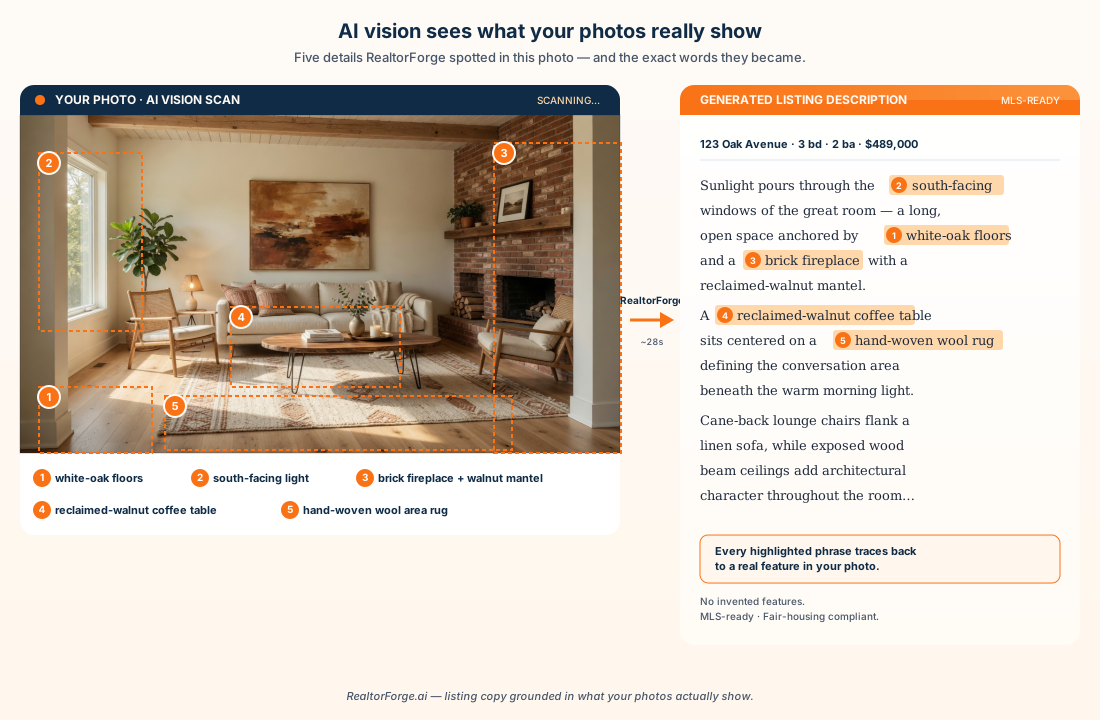
RealtorForge's description engine has two halves: a computer-vision model that looks at your listing photos, and a writing model that turns what it sees (plus what you type) into sentences.
What the vision layer notices:
The engine reads room type, finishes, flooring, countertop material, appliance brand cues, natural light direction, ceiling height, trim details, fixtures, views, and rough condition. It flags features agents forget to describe — the built-ins, the trim, the statement light, the window bench — and weaves them into specific sentences.
You're still in the driver's seat. Before writing, the tool asks you three things: price point, target buyer (first-time, move-up, downsize, luxury, investor), and any "don't-miss" features. It uses those to choose tone and emphasis.
A real example (before and after)
Here's the kind of shift you get. Same three-bedroom listing, one description written from a template, one written by RealtorForge's photo-aware model.
Template-filled version:
"Welcome home to this beautiful 3 bedroom, 2 bath home in a great location. This stunning property features a spacious open floor plan, updated kitchen, and lovely backyard. Don't miss this opportunity!"
Photo-aware version:
"Morning light pours through the south-facing great room at 123 Oak — a long, open space anchored by white-oak floors and a brick fireplace with a live-edge mantel. The kitchen just beyond it pairs quartz counters with matte-black fixtures and a waterfall island that doubles as the family's homework spot. Three bedrooms sit down the hall; the primary opens to a freshly tiled ensuite with a double vanity and walk-in shower. Outside, a flagstone patio steps down to a level, fenced yard — rare at this price in Maple Ridge."
Which one would make you click "see more photos"? That's the whole pitch.
The step-by-step: 60 seconds from photos to polished draft
Here's the flow, straight through.
- Upload photos. Drag in your listing photos — anywhere from 6 to 40 works. The engine will cluster them by room automatically.
- Confirm the facts. Beds, baths, square footage, lot, year built, neighborhood, price. Thirty seconds of typing or a paste from your MLS input form.
- Pick tone and buyer. Move-up family? First-time buyer? Luxury? Investor? The tone slider changes vocabulary without losing accuracy.
- Highlight the don't-misses. One-line notes like "backs to greenbelt" or "new roof 2024" make sure the AI promotes facts photos can't show.
- Generate. You get three drafts: short (MLS remarks, ~750 chars), medium (website/flyer), and long (blog or email).
- Edit and lock. Inline suggestions let you tighten, swap, or re-tone. Approve, and the same copy flows into every other RealtorForge asset — social posts, email, video script — so your voice stays consistent everywhere.
Five rules every listing description should follow
Good listing copy isn't just pretty — it has to be compliant and search-friendly. RealtorForge builds a short list of rules into the generation prompt so your first draft starts from safer ground — but you still review every draft before it goes out.
- Fair-housing aware. The prompt steers away from language that references protected classes, implies exclusion, or describes ideal occupants.
- Truthful phrasing. If the photo shows a half-bath, the AI writes "half-bath," not "second bath."
- MLS length limits. Short version fits under common character caps (1,024 or 750 depending on your MLS).
- SEO-friendly specifics. Neighborhood names, school districts, transit landmarks, and distinctive features are woven in naturally — which is what Google actually rewards.
- No hallucinated features. The model is scoped to what the photos show plus what you type. It won't invent a pool.
Five quick prompts to get sharper output
The magic isn't just the upload — it's the three seconds of guidance you give before the AI writes. Try these:
- Lead with the best moment in the house. "Start the description from the view out the back windows."
- Name the buyer in one sentence. "Written for a first-time buyer couple in their late 20s moving out of a downtown apartment."
- Add a must-mention specific. "Mention the 2023 HVAC and fresh exterior paint in the second paragraph."
- Set the length cap. "Keep the MLS remarks under 900 characters."
- Tone-shift a draft. "Rewrite this a little warmer and less sales-y."
These tiny nudges are what turn a good draft into your draft.
Why photo-grounded copy is better for SEO
A description that specifically names the kitchen countertop material, the flooring, the neighborhood, the schools, and the orientation ranks better than one that says "stunning open concept." Google's search algorithm rewards distinctive, specific information — it's the difference between a page that matches one buyer's query and a page that matches a hundred.
If you publish your listing pages to your own site (not just the MLS), RealtorForge-style descriptions bring:
- Long-tail keyword coverage (e.g., "bungalow with white oak floors in Maple Ridge")
- Local-SEO signal strength (neighborhood, school, transit names inside prose)
- Lower duplicate-content risk (every listing reads uniquely, not from the same template)
Over a year of listings, that's a real traffic lift.
What photo-grounded drafting actually saves
Writing a listing description from a blank page is 20–45 minutes of work on a good day — longer when writer's block hits — because you're doing two jobs at once: deciding what to say, and finding the words. A photo-grounded tool splits those apart. It drafts from what's actually in the pictures, so your job drops to editing a draft instead of composing from scratch. That's a smaller task, and it's the same task on every listing — which is where the real saving lives, not in any single number a vendor can promise.
FAQ
Will my MLS flag AI-generated copy? MLSs check for fair-housing compliance, factual claims, and length. RealtorForge's output is written to those rules by default, but a final review before you publish is always yours to do.
Can the AI describe a house it's never seen? Only from what you give it. It won't make up features. If your photos don't show the basement, it won't describe it — you'll prompt it with a note or a photo.
Does this work for commercial and rental listings? Yes. Tone presets include "rental," "commercial," "multi-family," and "vacation short-term."
Can I use my own voice or past listings as a reference? Yes. Paste in three of your favorite descriptions and the tool will match your cadence.
Ready to kill the blinking cursor? Try RealtorForge on your next listing →
Sources
- HUD — Housing Discrimination Under the Fair Housing Act (protected-class terms that must stay out of listing copy)
- National Association of REALTORS® — Fair Housing (fair-housing rules for how a property is advertised)
- National Association of REALTORS® — Handbook on Multiple Listing Policy (what MLS rules say about listing content — local association rules vary)
- Google Search Central — Creating Helpful, Reliable, People-First Content (why photo-grounded, people-first copy is what Search rewards)
Related reading