
Your First Great Listing Video — Without the Production Crew
AI-generated script, shot list, and b-roll plan for every listing. How RealtorForge builds a 60-second property video plan you can actually shoot.
If you've ever watched a realtor's listing reel that actually worked — the one with momentum, captions that pop, a hook in the first three seconds — you've noticed the same thing: it doesn't feel random.
It's storyboarded. Every shot has a job. The pacing follows a script. Somebody thought through it.
That's the part most agents skip, and it's the reason so many property videos quietly die with almost no views. Not because the camera was bad. Because there was no plan.
RealtorForge generates the plan for every listing — a written script, a numbered shot list, b-roll ideas, and on-screen caption text — in under a minute. You (or a videographer with a gimbal) just follow it.
Here's how the tool thinks about listing video, and the 60-second structure that works on Reels, TikTok, YouTube Shorts, and your website.
Why realtors skip video (and why that's about to change)
The real reasons video doesn't happen:
- "I don't know what to say."
- "I don't know what to shoot."
- "Editing is a black hole."
- "It takes all day."
Three of those four are solved by a script and a shot list. The fourth (editing) gets massively shorter when the shots you capture actually match the script — which is the whole point of shooting to a plan.
The agents who crack listing video consistently are not the ones with the best gear. They're the ones with a repeatable template they run every listing. RealtorForge gives you that template, tuned per property.
The 60-second tour that works
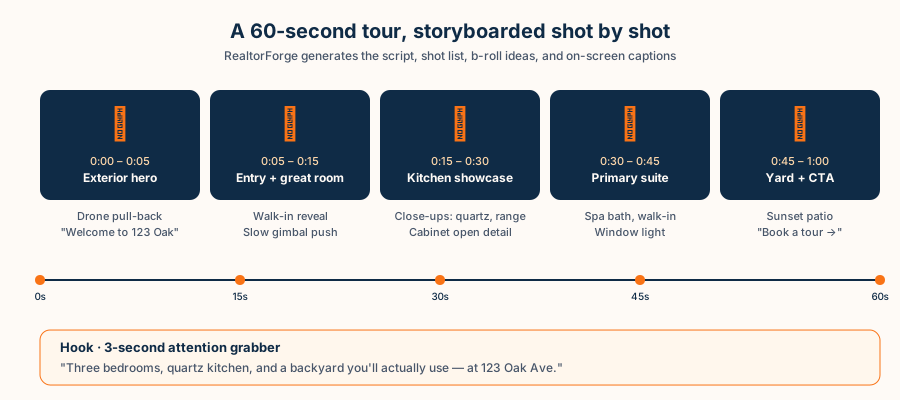
The industry default has settled around 45–75 seconds. Long enough to show the house; short enough to survive vertical video retention curves. Here's the structure the AI produces as a starting point:
0:00 – 0:03 · The hook. A visual pattern interrupt plus a one-line promise. "Three bedrooms, quartz kitchen, and a backyard you'll actually use — in Maple Ridge, $489K."
0:03 – 0:10 · Exterior hero. Drone pull-back or walking approach. Curb appeal, framing the house.
0:10 – 0:20 · Entry + great room reveal. The "walking in" moment. Single continuous shot if possible.
0:20 – 0:35 · Kitchen. The highest-intent room in most listings. Wide establishing shot, two detail shots (countertop, range, hardware).
0:35 – 0:45 · Primary suite. Including the bath. Soft pan.
0:45 – 0:55 · Yard / outdoor. Golden-hour if you can swing it. Lifestyle cue — chairs on the patio, smoke off a grill.
0:55 – 1:00 · CTA. Address, your face, "book a tour" overlay, the QR code for the landing page.
That's the skeleton. The content — the words, the captions, the specific shots — gets tuned to the house.
What an AI video script tool produces per listing
For a given listing, RealtorForge generates:
1. The written script. Voice-over lines or on-screen text, paced to the shot timings. Written in your tone.
2. The shot list. Numbered shots with camera movement ("slow gimbal push from entry toward fireplace"), framing notes ("wide, low angle, slight tilt up"), and a must-include feature check ("include the island waterfall edge").
3. B-roll suggestions. Detail shots the AI spotted in your photos — cabinet open, light through a window, a plant, a fixture, a doorknob.
4. On-screen captions. Caption text timed to shots ("3 bed · 2 bath · 1,840 sqft · $489K"), styled to platform best-practice.
5. A music/energy brief. Two or three suggested track moods (warm-acoustic, upbeat-pop, cinematic-pulse) with bpm matching your shot rhythm. You pick a song; the shots line up.
6. Platform versions. The 60-second cut plus a 30-second Reels/TikTok cut and a 15-second teaser. One shoot, three outputs.
A real example script (just the words)
Here's the voice-over / caption track the AI might generate for a three-bedroom Maple Ridge listing:
(0:00) Hook, on screen: "$489K in Maple Ridge. Seriously."
(0:03) VO: "Three bedrooms, two baths, and the kitchen you've been looking for."
(0:10) VO: "Walk in and the whole great room opens up — white oak floors, a brick fireplace, light from the west."
(0:20) VO: "The kitchen is the star. Quartz counters, matte black hardware, gas range, and an island that doubles as the kids' homework HQ."
(0:35) VO: "Down the hall, the primary suite. Double vanity, walk-in tile shower, a walk-in closet that actually fits."
(0:45) VO: "Out back: flagstone patio, flat fenced yard, room for the dog and the grill."
(0:55) On-screen + VO: "123 Oak Ave · Open Saturday 1–3 · Book a tour →"
Notice two things. First, every sentence names a specific feature (not "gorgeous" or "spacious"). Second, the ending is a CTA — every video tells the viewer what to do next. Those are the two rules that beat every "cinematic real estate reel" checklist.
The shot list you hand to your videographer (or yourself)
RealtorForge prints a one-page shot list you can hand to anyone with a phone or a gimbal. An example:
- Exterior hero — drone pull-back from 40 ft AGL, full house in frame (0:03–0:10). If no drone, walk-in approach on gimbal, framing the front door.
- Entry reveal — slow gimbal push, hip height, door to great room, continuous for 5–6 seconds (0:10–0:16).
- Great room wide — static, low tripod, include fireplace and windows (0:16–0:20).
- Kitchen wide — eye-level gimbal, left-to-right pan, 4 seconds (0:20–0:24).
- Kitchen detail A — quartz counter close-up (0:24–0:27).
- Kitchen detail B — range + hood hero (0:27–0:31).
- Island detail — waterfall edge, slight push-in (0:31–0:35).
- Primary suite wide — doorway reveal, push in (0:35–0:39).
- Bath detail — shower tile close (0:39–0:42).
- Walk-in — pan across closet (0:42–0:45).
- Patio wide — low angle golden hour (0:45–0:50).
- Yard stroll — gimbal follow the dog / kid / homeowner (0:50–0:55).
- CTA card — talking head, 6 seconds, "book a tour" overlay (0:55–1:00).
One afternoon, 45–60 minutes at the house, 13 shots. That's the shoot.
Edit in under an hour
Editing tends to be the bottleneck, so the script is designed to be editable fast. Drop shots on the timeline in order, match them to the caption timings the AI already generated, pick a music track at the suggested BPM, export three aspect ratios.
If you use Premiere, CapCut, Final Cut, or DaVinci Resolve, the RealtorForge export includes a ready-to-import caption file (.srt or .xml) so you don't re-type a thing.
Captions earn the first three seconds
Most people scroll Reels and TikTok with the sound off, so the first three seconds have to work muted. If your video doesn't have big, legible on-screen text in that window, you've already lost them.
RealtorForge puts the hook as a caption first ("$489K in Maple Ridge. Seriously."), then transitions to the voice-over. The caption styling follows platform-specific best practice — which is boring to research and worth getting right once.
Five reusable video concepts the AI can generate per listing
Beyond the core 60-second tour, the AI can produce:
- Feature-focus reel. One room, one angle ("why this kitchen is worth $489K").
- Seller story. The homeowner shares why they loved living there, cut over b-roll.
- Day-in-the-life. Morning coffee on the patio → breakfast in the kitchen → school drop-off view.
- Price-anchored walk-through. "What $489K gets you in Maple Ridge."
- Open-house recap. Short crowd/energy cut posted Saturday evening.
Those five concepts, spread across a listing, outperform one "cinematic reel" every time.
FAQ
Do I need a drone or gimbal?
Neither is required. The AI tailors the shot list to the gear you own, from iPhone handheld to full cinema package.
Can the AI generate the video, not just the script?
RealtorForge assembles a basic cut from your raw clips using the shot-order plan. Most agents still hand the final polish to a human editor — but the rough cut saves the editor an hour or more.
What music should I use?
Platform-licensed music (Meta's Sound Collection, TikTok Commercial library) for safety. The AI suggests specific tracks that match your video's bpm and mood.
Does this work for luxury listings too?
Yes. The tone, pacing, and shot list adjust automatically — luxury runs slower, more cinematic, with longer holds and darker grades.
Ready to finally shoot your first great listing video? Generate a script for your next property →
Sources
- National Association of REALTORS® — Research and Statistics (video and technology adoption among agents and buyers)
- HUD — Housing Discrimination Under the Fair Housing Act (fair-housing law applies to video listing content too)
- Meta for Business — About Special Ad Categories (housing, employment, credit) (boosting a listing video is a housing ad with restricted targeting)
Related reading