
Real Estate Social Media Posts, On Autopilot: Every Platform, Every Listing
Stop rewriting the same caption four times. RealtorForge AI builds a week of real-estate social posts for Instagram, Facebook, and X — from one listing.
Here's the honest state of most realtors' social media: one or two Instagram posts per listing, a re-share to Facebook business page, a tweet a few days later, and a quiet wish that you'd done more.
It's not a discipline problem. It's a time problem. Every platform wants a different aspect ratio, a different caption length, a different hashtag style, a different tone. By the time you've rewritten a caption three ways, the dog needs a walk and the listing is stale.
RealtorForge's social layer fixes the time problem. One listing becomes a week of platform-native posts on Instagram, Facebook, and X — all editable, all schedulable, all from one screen.
Here's how working agents are using it — and a content calendar you can lift as-is.
Why listings fail on social (and what actually works)
Three honest reasons a listing doesn't get traction on social media:
- One-and-done posting. One post on day one, silence after. The algorithm rewards frequency on a property, not just on a profile.
- Copy-paste across platforms. An Instagram caption dumped into a tweet gets cut off. A long Facebook post on X reads like an essay nobody finishes.
- No human angle. Listings compete with people's friends' vacation photos and dog videos. "3BR/2BA at $489K" isn't beating a labrador.
The fix is a multi-post, multi-platform, multi-angle rollout where each piece shows a different face of the same house — the neighborhood, the kitchen, the backyard, the seller's story, the open-house energy. RealtorForge's AI plans and writes that rollout automatically.
What an AI social tool creates from one listing
When you add a listing to the stack, the social layer generates:
- A "coming soon" teaser (1–2 photos, short caption, mystery angle)
- A hero reel script + caption (30-second vertical, IG Reels and Facebook Reels)
- A 10-image carousel (Instagram and Facebook, each captioned)
- A photo album post (Facebook business page)
- Story / countdown cards (IG Stories, sized correctly, with a countdown to open house)
- An X thread (bite-sized bullets + key photo)
- An open-house card (with RSVP link)
- A "just listed" walk-through reel script
- A "just sold" recap card (post-close)
Each post comes out in the right aspect ratio — 1:1 for Facebook feed, 4:5 for Instagram, 9:16 for Reels and Stories, 16:9 for X media — with platform-native caption length and hashtag style.
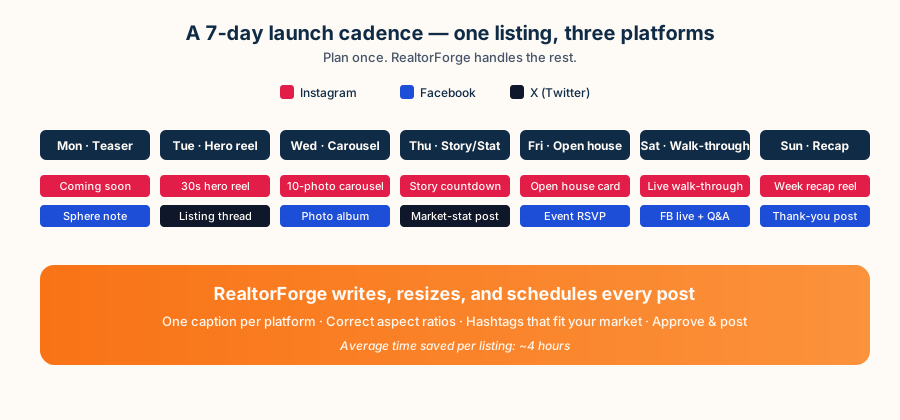
The 7-day listing launch calendar you can copy
This is the default calendar RealtorForge suggests for a new listing, tuned for mid-size metro agents. Edit it to your market.
Monday — Coming Soon. Mystery exterior shot. IG teaser. Facebook post to your sphere. A short tease on X with the neighborhood and price band ("New listing dropping Friday in Maple Ridge — under $500K").
Tuesday — Hero Reel. A 30-second walk-through reel. Post to Reels, cross-post to Stories and Facebook Reels, drop a short text+photo X post linking to the listing page.
Wednesday — Carousel Day. A 10-photo carousel on IG and an album on Facebook. Caption highlights three specific features (kitchen, yard, primary suite).
Thursday — Story Countdown. IG Story card counting down to Saturday open house. X post with a market-stat angle ("median days-on-market in [neighborhood] is X — priced to move faster").
Friday — Open House Invite. RSVP card across all platforms with a link to the QR landing page.
Saturday — Live Walk-through. Go live from the open house on IG + Facebook. Short X thread of "what buyers asked today."
Sunday — Recap. Thank-you post, offer-deadline nudge, a repost of the hero reel.
Ten to fifteen posts across the week — versus the one or two most listings actually get.
How the AI edits the same message for each platform
The trick isn't writing more posts — it's writing one message and expressing it three different ways. Here's how RealtorForge does that from the same listing:
Instagram (caption)
"Quartz kitchen. Fenced yard. West-facing living room that gets that perfect 6 p.m. light. 3 bed, 2 bath in Maple Ridge at $489K. Open Saturday 1–3. Tap ↗ for the tour. #maplerealestate #homeforsale #maplehomes"
Facebook (page post)
"New on the market in Maple Ridge — a bright 3 bed, 2 bath on a fenced lot with the updated kitchen you've been waiting for. We're hosting an open house Saturday from 1–3 pm. Comment 'link' and I'll DM you the full tour."
X (thread, first post)
"New listing in Maple Ridge. 3 bed/2 bath. $489K.
Quartz. Fenced. West-facing. Thread 👇"
Same listing, three tones, three aspect ratios, three audiences. You edit once; the AI keeps platform voices consistent.
Hashtags that work (and how AI picks them)
Most real-estate hashtags agents use are saturated and invisible. RealtorForge pulls a fresh list per listing by combining:
- Hyper-local tags.
#maplerealestate #maplehomes #maplemoms— the small, active tags in your actual market. - Feature tags.
#quartzkitchen #fencedyard #primarysuite— specific to what's in the photos. - Stage tags.
#justlisted #comingsoon #openhouseweekend— timed to the rollout. - Broad tags used sparingly.
#homeforsalealone is a ghost town; in a mix of 10–15 it earns discovery.
The tool avoids banned or shadow-banned tags and caps counts at platform best-practice — around 10 for Instagram, 1–3 for Facebook, 1–2 for X.
Approve once, publish everywhere
Here's the last mile most agents lose. You have ten posts ready — now you need to post them on the right days. RealtorForge connects directly to your Meta (Instagram + Facebook) and X business accounts and schedules the calendar. You see every post in a weekly timeline. Edit inline, drag to reschedule, or approve-and-forget.
If a listing gets an offer early, hitting Pause Campaign quietly pulls the scheduled posts so you don't announce an open house on a property already under contract.
Measuring what matters (beyond likes)
Likes are cheap and misleading. What actually matters for listings:
- Saves and shares (intent signals — the buyer is coming back)
- Profile visits (people checking if you're the agent for them)
- Click-throughs to the listing landing page (the QR-code page that feeds your CRM)
- DM volume (real-life questions)
- Comments with specific questions ("what's the taxes?" — hot)
RealtorForge pulls those numbers per listing and per post so you can see which angles work in your market. After five or six listings, you'll notice patterns — e.g., "reels outperform carousels 3:1 for my suburban move-up listings" — and the AI shifts the calendar accordingly.
Where the time actually goes
The manual version of a serious ten-post listing campaign is hours of production: resizing every image for each platform, writing and rewriting captions, researching hashtags, and scheduling the calendar by hand. None of that is the skill an agent is paid for — it's the tax on doing the marketing at all.
The point of automating it isn't a stopwatch number nobody can honestly promise you; it's that the production work moves off your plate and what's left is the part that needs your judgment: reading the drafts, fixing what's wrong, approving. You edit instead of manufacture.
FAQ
Do I need a separate scheduling tool? No. RealtorForge posts directly to your connected Instagram, Facebook, and X accounts — no Buffer or Hootsuite required.
What if my brokerage has compliance rules? Add your disclaimers and fair-housing text once in brand settings; every post appends them automatically.
Can I override the AI's captions? Always. Every draft is editable, and you can save a favorite phrasing as a style template.
Does this work if I'm a team lead posting for multiple agents? Yes — you can manage multiple brand voices and route approvals between agents and TCs.
Ready to stop re-writing the same caption three times? Launch your next listing on RealtorForge →
Sources
- Meta for Business — About Special Ad Categories (housing, employment, credit) (listing ads run in the Housing Special Ad Category — no targeting by protected class)
- HUD — Housing Discrimination Under the Fair Housing Act (the Fair Housing Act the ad rules exist to enforce)
- National Association of REALTORS® — Fair Housing (NAR fair-housing guidance for real estate marketing)
- National Association of REALTORS® — Research and Statistics (how agents use social media in practice)
Related reading