
Real Estate Email Campaigns That Actually Get Opened (and Earn You Showings)
Your sphere is your best list. RealtorForge AI builds just-listed emails, follow-ups, open-house invites, and reminders that turn contacts into showings.
Email is the most underrated marketing channel in real estate, and it's not close. It's free, it's direct, and it's yours — no algorithm quietly hiding your listing from 80% of the people who asked to hear from you.
And yet, most agents send one email per listing (the "just listed" blast) and stop. Open rates look okay. Nothing happens. They conclude email "doesn't work."
The problem isn't email. It's the campaign — or the lack of one.
This post walks through the four-email campaign RealtorForge generates for every listing, the subject-line patterns that earn opens in real estate, and the small personalization tricks that turn your sphere into showings.
Your sphere is better than any paid lead source
A quick reality check: an agent with 800 past clients, friends, referral partners, and warm contacts has a better list than almost any Zillow-sourced buyer account you can pay for. Those people already know your name, your face, and whether they liked working with you.
Two things they don't know: that you just listed something, and that you'd love to work with them again.
A proper listing email campaign fixes both — and it's the fastest, cheapest marketing move in real estate.
The four-email listing campaign
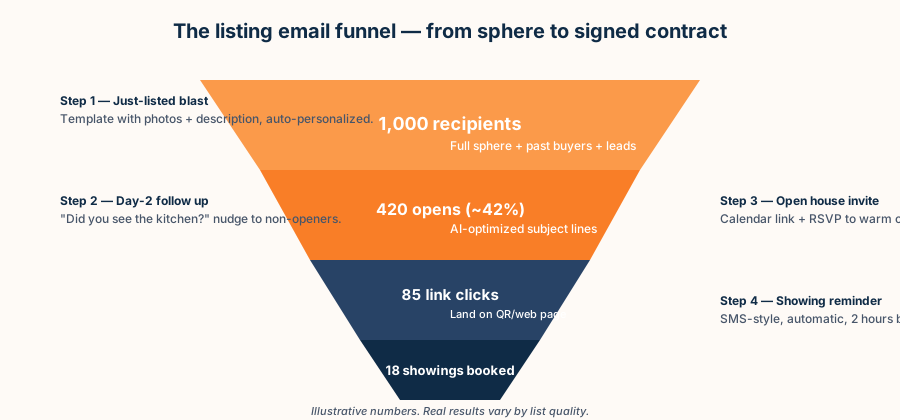
RealtorForge's default campaign is four emails over seven to ten days. Each one has a specific job. You approve them once at the start of the listing and they send automatically.
Email 1 — Just Listed
Goal: Announce. Show the property. Get the click.
Timing: Day 1, morning of the listing going live.
Subject lines that work:
- "Just listed in [Neighborhood]: [feature + price]"
- "New on the market: [property hook]"
- "[First name], you asked about Maple Ridge — new one today"
The third version is segment-specific (it only goes to people you've tagged as asking about that neighborhood). A segmented send gets opened more, because the subject line is actually relevant to the person reading it.
What's in the email: Three hero photos. The AI-written description (short version — full description lives on the landing page). Price, beds, baths, square footage. One big "See the full tour" button to the QR landing page. Your face, your phone, your signature.
Email 2 — Day-Two Follow-Up to Non-Openers
Goal: Second chance for the people who didn't open email 1.
Timing: 36–48 hours after Email 1, only to non-openers.
Subject lines that work:
- "Did you see the kitchen?"
- "Still on the market — for now"
- "Quick look: 123 Oak"
What's in the email: A different hero photo than email 1 (the kitchen, or the yard, or the feature you're proudest of), a single sentence of context, and one button. Shorter than email 1 — think postcard, not brochure.
This resend-to-non-openers step is the highest-leverage email in the sequence: it gives your listing a second chance with everyone who missed it, without re-emailing the people who already opened.
Email 3 — Open House Invite (to clickers)
Goal: Convert interest into a visit.
Timing: 2–3 days before open house, only to people who clicked in email 1 or 2.
Subject lines that work:
- "Open house Saturday 1–3 — want me to save you a time?"
- "[First name], quick question about 123 Oak"
- "Thinking of stopping by Saturday?"
What's in the email: Conversational tone. Acknowledge they clicked. Offer a short, specific slot ("I'd love to walk you through at 1:15 — works?"). This email is the workhorse of the campaign; it's the thing that turns a curious scroll into a physical body in the house.
Email 4 — Showing/Open-House Reminder
Goal: Reduce no-shows. Remind the RSVPs who forget — most do.
Timing: Morning of the open house OR two hours before a private showing.
Subject lines that work:
- "Today at 1 pm — 123 Oak, see you there"
- "Reminder: open house starts at 1"
- "Here's the address + a few pics to get you excited"
What's in the email: One photo, the address with a one-tap map link, the time, your phone number, and a parking note. Short. Cheerful. Done.
Why this campaign beats the "just listed and done" approach
The logic is simple. One email reaches your list once, on one morning; the people who were busy, or whose inbox buried it, never see the listing at all. A four-touch sequence gives the same listing several more chances — a resend to non-openers, an invite to the people who clicked, a reminder before the open house — without pestering the people who already engaged.
More relevant touches to an opted-in list is how one listing turns into showings instead of a single ignored blast. And once you approve the sequence at the start of the listing, the incremental work is zero.
Subject lines: what actually earns opens in real estate
A few subject-line patterns hold up across real estate email generally.
Specificity beats hype. "Just listed: $489K 3BR in Maple Ridge" beats "Amazing new home just listed!" every time. Numbers in the subject line are a green flag to inboxes.
A question outperforms a statement. "Did you see the kitchen?" tends to out-open "New kitchen listing." A question hooks scanners.
First name in the subject line helps — sometimes. Works great for friends/sphere. Feels weird for cold leads. RealtorForge toggles personalization by segment.
Emoji: one, maximum, and only if it fits your brand. 🏡 is fine. 🔥 is tired.
Length: 35–50 characters so the full line shows on phones. Preheader text (the gray line under the subject) is half the battle; write it like a second subject line, not "click here to view."
Personalization that doesn't feel creepy
The difference between good and great email in real estate is personalization that feels like you remembered them, not like a database wrote the email.
- Neighborhood match. If a contact said they liked Maple Ridge two years ago, a Maple Ridge listing goes to them first, with a reference: "you mentioned Maple Ridge when we chatted last fall."
- Buyer stage. First-time buyers get a slightly different pitch than move-up families. The AI handles the tone swap.
- Past-client recognition. Past clients get a warmer opener ("hope the new kitchen you did is treating you well") and a referral ask in email 4.
- Lead-source memory. People who came from an open house six months ago get a nod: "you toured 87 Linden in October — thought this one has a similar vibe."
You don't build these merges. The AI pulls them from your CRM notes.
The one deliverability rule nobody tells you
Sending 1,000 emails at 9 a.m. Monday looks like spam to inbox providers, and a chunk of your list won't even see email 1. RealtorForge sends in paced batches (50–100 per minute), from a warmed-up sending domain that matches your brand, and respects your list's historical open-time patterns.
Translation: your emails actually land in the inbox. That sounds basic; it's more than half the battle.
Compliance, quietly
Two things the tool handles so you don't have to:
- CAN-SPAM / CASL footer. Every email gets your real mailing address, brokerage info, and a working unsubscribe link.
- State licensing disclosures. Some states require license numbers on real-estate marketing. RealtorForge knows yours and appends correctly.
What a multi-touch campaign actually changes
We're not going to hand you invented open rates. RealtorForge has no customer campaign data to average, and the sky-high numbers gurus screenshot are unverifiable. What a four-email sequence changes is structural, and that part is real: a single "just listed" blast reaches your list once, on one day, at one time. A sequence that re-sends only to people who didn't open, segments by the neighborhood someone actually asked about, and reminds RSVPs the day before an open house simply gets your listing in front of more of the people who already opted in to hear from you. The lift comes from more relevant touches — not from a magic number.
FAQ
Does this replace my CRM?
No — RealtorForge connects to your CRM (Follow Up Boss, kvCORE, HubSpot, Mailchimp, Sierra, and more). It uses your contacts and writes back engagement data.
Can I use my own templates?
Yes. Import an HTML template or let the AI propose one in your brand colors. Every email is editable before send.
What about drip campaigns for buyers, sellers, and past clients?
The listing campaign is one of several RealtorForge templates. Long-running nurture drips (new buyer, past client, expired-lead) are built in too.
Is this email blasting? Will I get blacklisted?
No. Paced sends, authenticated sending domains, and clean list hygiene mean your emails land in real inboxes. Avoid buying email lists and you'll be fine.
Ready to turn your sphere into showings? Start a campaign on RealtorForge →
Sources
- Federal Trade Commission — CAN-SPAM Act: A Compliance Guide for Business (CAN-SPAM: unsubscribe link, valid physical address, no deceptive subject lines)
- National Association of REALTORS® — Research and Statistics (the share of business that comes from an agents sphere and referrals)
- HUD — Housing Discrimination Under the Fair Housing Act (fair-housing rules apply to marketing email copy)
Related reading