
QR Code on the 'For Sale' Sign: The Smart Realtor's Drive-By Secret
Put a QR code on your yard sign and turn every drive-by into a named lead. How RealtorForge builds a mobile landing page for every listing.
Think about the last time you drove past a "For Sale" sign and got curious.
You did one of two things. Either you wrote nothing down and forgot about it by the next block, or you fumbled with your phone, typed the address into Zillow, tapped through three screens, and maybe landed on the right listing. And the agent whose sign sparked all that? Never knew you existed.
That's a lot of invisible demand.
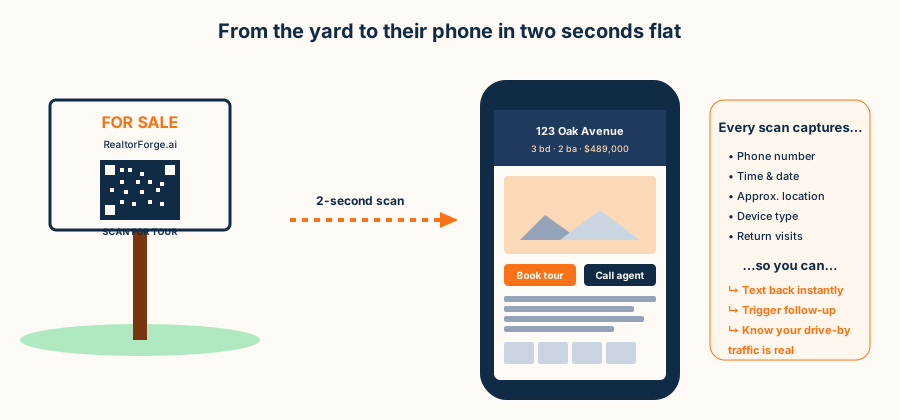
A QR code on the yard sign fixes it in one step. A curious driver stops, taps their phone camera on the code, and the property's full mobile landing page opens — photos, description, tour video, map, "book a tour" button, your phone number. The scroll-by becomes a scroll-through. And the scan becomes a lead.
RealtorForge generates the landing page, the QR code, and the lead capture for every listing automatically. Here's how it works and what it earns agents who use it.
What a good property landing page looks like on a phone
Buyers don't scan a sign and want the MLS. They want the house — fast.
RealtorForge's mobile landing page is optimized for the 15-second attention window of a person standing on the sidewalk. The page leads with:
- Hero photo + address + price in the first scroll.
- Two big buttons — "Book a tour" and "Call agent."
- Scrollable photo gallery with swipe (typically the highest-engagement element on a listing page).
- A 60-second tour video from the RealtorForge video script.
- The full property description below the fold.
- A map pin + neighborhood snapshot (schools, transit, parks).
- A short lead form — just name, phone, and "best time to tour."
- Your face, name, and brokerage — because trust.
Load time under two seconds on 4G. No modal pop-ups. No autoplay audio. No newsletter sign-up blocker. Exactly what a curious buyer on a sidewalk needs.
The QR code nobody throws away
A good yard-sign QR code has three jobs: be scannable, be branded, be trackable.
Scannable. The RealtorForge QR is the right size (2 inches minimum for a yard-sign distance), high contrast (dark on light), and includes a quiet zone so no one has to hold their phone six inches away in the rain.
Branded. The tool allows a small logo mark in the center of the code (up to 20% of the surface, standards-compliant). Most agents add their initials or a tiny house icon — just enough to prove the sign isn't a random scam.
Trackable. Every scan hits a short RealtorForge URL that records the scan event (date, time, device type, approximate location) before redirecting to the landing page. That's how we know drive-by traffic was never zero — it was just invisible.
A small visual touch that matters: the "SCAN FOR TOUR" call-to-action text above the code. A naked QR square asks a stranger to point their camera at it for no stated reason; the label gives them the reason. People need permission.
How a scan becomes a lead
Here's what actually happens in the 30 seconds after a scan — and why the lead capture is quiet but ruthless:
- Scan fires a tracking event. Even if the visitor bounces without filling anything out, you've logged: date, time, device, approximate location. Repeat scans from the same device are flagged — a hot sign.
- Landing page loads fast. Two seconds, tops. Longer and half the visitors bail.
- Book-a-tour button is one tap. No form on the first screen; just a button. Taps open a two-field micro-form (name, phone) with a fallback to one-tap calling.
- Call agent button dials you directly. Goes to a trackable forwarding number so you know it came from the QR, not from Zillow or a social post.
- Exit-intent prompt on gallery scroll. If a visitor scrolls past the fifth photo, a soft "want the floor plan? text it to me" prompt appears. Low friction, high conversion.
- Contact lands in your CRM. Name, phone, timestamp, listing address, scan location. Triggers a follow-up sequence: a text in 3 minutes, an email in an hour, a call tomorrow.
The punchline: every yard sign becomes a lead-generation engine, not just a marker.
What drive-by scan data actually tells you
The scan data tends to surface a few patterns you can plan around:
- Saturday and Sunday mornings, 8–10 a.m. are the biggest drive-by windows — earlier than you'd guess. Weekend runners and coffee-walkers.
- Weekday rush hour, 5–7 p.m. is the second peak.
- Scans climb the week of the open house, and directional signs with QRs earn scans of their own — worth adding to the main yard sign.
- Return scans from a second device — a phone at the curb, then a laptop at home, often a partner's — are a strong buying signal. Serious buyers shop twice.
That last one is the most valuable signal in real estate lead-gen. It tells you which address is attracting actual intent, not casual curiosity.
How to put this on your sign (practical guide)
The mechanics are simpler than most agents expect.
Size. 2–3 inches square, printed as part of the sign rider (not a sticker — stickers weather). Go slightly bigger on a directional sign read from a car window.
Placement. Bottom right of the main sign, above your phone number. Your brand stays the dominant thing; the QR is the secondary thing.
Call to action. "Scan for tour" or "Scan to see inside" above the code. Four words, maximum.
Materials. Printed on coroplast or aluminum with UV-resistant ink. The QR still has to scan in winter glare.
Testing. Before you plant the sign, scan from 4 feet away in daylight and dusk. If either fails, reprint with higher contrast.
Signage vendor template. RealtorForge exports a print-ready PDF with bleed and crop marks. Send it to your signage vendor — most know exactly what to do with it.
The landing page also doubles as your listing's home online
Here's the quiet bonus. That same RealtorForge landing page is:
- The URL you put in your email campaign ("see the full tour")
- The destination behind every social post's "link in bio"
- The page your video reels send viewers to
- The page indexed by Google under your brokerage domain
- The mobile experience an out-of-town relative sees when the seller shares "our listing"
One page, many front doors. Which also means one set of analytics — you see exactly which channel drove which visitor to which listing. That clarity is worth the price of the whole tool by itself.
SEO: yes, your listing page can actually rank
Most MLS listing pages are invisible to Google (behind syndication, thin content, aggressive JS). A RealtorForge landing page is a real, crawlable, schema-marked page on your domain, with:
RealEstateListingJSON-LD schema (Google's dedicated listing type, showing rich snippets)- Local-SEO signals — neighborhood name, city, state, zip in prose and in structured data
- Fast mobile load (Core Web Vitals: green)
- Canonical URL you can share confidently
Over a year of listings, that footprint compounds. Prospective buyers searching "3 bedroom in Maple Ridge" or "homes near Elm Park" start landing on your listings — which sends them into your funnel, not Zillow's.
What to expect — and what nobody can promise you
Here's the honest version. RealtorForge is new, so there is no customer dataset to quote you, and any article that hands you "you'll get 12 leads in 90 days" is inventing the number. What a QR-to-landing-page flow reliably changes is the mechanics, not a guaranteed count: a phone number on a sign captures nothing until someone decides to call, while a scan that opens a capture-first page turns an anonymous drive-by into a named contact with a timestamp, a listing, and a sign location attached to it.
Whether that produces a handful of leads or many depends on your sign count, your market, and how fast you follow up — not on anything a vendor can promise in a blog post. The point isn't a magic conversion rate. It's that yard-sign interest, which is normally invisible, becomes something you can actually see and act on.
FAQ
Is this MLS-compliant?
Yes. The QR points to your own domain, which links back to the MLS listing where required. Disclosure language on the landing page follows NAR and state guidance.
What about privacy and tracking?
RealtorForge captures only what users explicitly submit (name, phone), plus anonymized scan telemetry (time, approximate city, device type). GDPR and CCPA language are baked into the page footer.
Can the QR code change if my listing changes?
Yes — the QR is a short redirect. If the listing pulls or price changes, the destination updates without reprinting the sign.
Do I need a developer to set up the landing page?
No. Every RealtorForge listing generates a landing page automatically, on a subdomain of your choice (listings.yourbrand.com/123-oak).
Ready to turn every drive-by into a lead? Generate your first QR sign on RealtorForge →
Sources
- Google Search Central — Creating Helpful, Reliable, People-First Content (how a listing landing page gets crawled and ranked)
- National Association of REALTORS® — Research and Statistics (buyers begin the search online before contacting an agent)
- HUD — Housing Discrimination Under the Fair Housing Act (landing-page copy is advertising and is fair-housing bound)
Related reading