
The AI Real Estate Marketing Stack: Turn One Listing Into a Whole Campaign
How modern real estate agents are using RealtorForge's AI marketing stack to turn a single listing into photos, descriptions, social posts, emails, video script
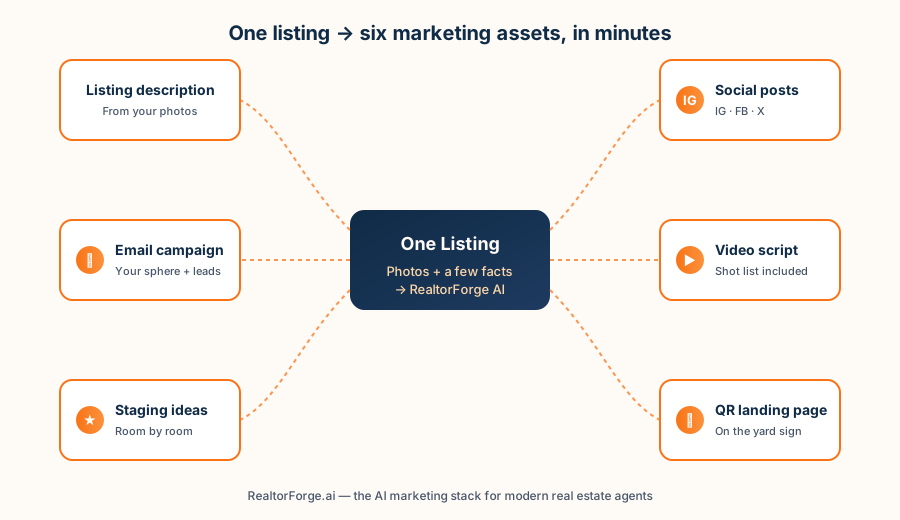
If you're a real estate agent in 2026, you already know the math: every new listing is a mini marketing project. Descriptions. Photos. Captions for Instagram, Facebook, and X. An email to your sphere. A reel. Maybe a flyer. Maybe a QR code on the sign.
Do that eight times a month and you're basically running a small agency on top of showings, offers, and inspections.
RealtorForge was built to make that one listing feel like one task again. Upload your photos, add a few facts, and the AI turns out everything you need to launch — polished, on-brand, and ready for your approval.
This pillar post is a quick tour of the full stack. Each section links to a deeper guide for agents who want to go further.
Why "stack" matters for real estate marketing
A great listing campaign isn't one amazing asset — it's seven okay-to-great assets that all point at the same property and the same buyer. Most agents lose on volume, not quality. They write a good MLS description, post one photo to Instagram, and the campaign basically ends there.
An AI marketing stack flips the math. It takes the thing you'd do anyway (upload photos, type a few details) and multiplies it into the eight or nine touchpoints buyers actually see — without eight or nine hours of copy-paste.
Here's what the RealtorForge stack looks like, and where each piece earns its keep.
1. AI property descriptions — from your photos
You upload the photos. The AI reads them — rooms, finishes, natural light, style cues — combines that with the facts you add (beds, baths, square footage, lot, neighborhood), and writes an MLS-ready description in your voice.
Not "luxurious oasis" boilerplate. Real sentences that describe the real house.
That means you get past the blank-page problem on day one of the listing, and your words stay consistent across the MLS, your website, and every social post that follows.
→ How AI writes property descriptions from photos (deep dive)
2. Social media posts — every platform, sized right
One listing has a dozen natural social moments: the "coming soon" teaser, the hero reel, the carousel, the open-house countdown, the walk-through, the "just sold" recap.
RealtorForge writes the caption for each one, sizes the images correctly for Instagram, Facebook, and X, suggests hashtags that actually work in your market, and lets you approve and schedule everything from one screen.
→ Real estate social media posts made easy
3. Email campaigns — your sphere is your best audience
Most agents have 400–2,000 people in their sphere and past-client list. That's a better audience than any cold lead source you can buy — and they almost never get a proper email when a new listing goes up.
RealtorForge builds a campaign: a just-listed blast, a day-two follow-up to non-openers, an open-house invite to anyone who clicked, and a showing reminder. All of it templated, personalized, and tracked.
→ Real estate email campaigns that actually get opened
4. Video scripts + a real shot list
Video sells houses. Everyone knows. Almost no one shoots it consistently because writing a script and planning shots is the hard part.
RealtorForge generates a 30-, 60-, or 90-second script from your listing, plus a shot list, b-roll ideas, and on-screen captions. You (or a videographer with a gimbal) just follow it.
→ Property video scripts without the production crew
5. Staging ideas for empty or dated rooms
Vacant listings photograph cold. Dated rooms photograph tired. RealtorForge looks at the photos and suggests staging directions — color palettes, furniture scale, lighting moves, accessory ideas — room by room.
You hand the suggestions to your stager, your seller, or a virtual-staging tool, and the photos stop apologizing.
→ AI virtual staging ideas that work
6. A landing page + QR code on the yard sign
This is the sleeper favorite. Every listing gets its own mobile-friendly landing page, and RealtorForge prints a QR code that goes on the "For Sale" sign. Drivers stop, scan, and see the whole property on their phone in seconds — including a one-tap "book a tour" and "call agent" button.
You get their number, their scan time, and a new lead in your CRM.
→ QR code "For Sale" sign landing pages
How it all fits together
Think of your listing as one input and the stack as six simultaneous outputs. Your job shifts from creating each asset to approving each asset — which is the work only you can do anyway.
| Input | Output | Who still does what |
|---|---|---|
| Photos + a few facts | MLS description | You approve tone & details |
| Photos + neighborhood info | Social posts for 3 platforms | You approve captions & schedule |
| Listing details + your list | Email campaign (3–4 emails) | You approve subject & timing |
| Listing photos + featured rooms | Video script + shot list | You (or a videographer) shoot |
| Room-level photos | Staging directions per room | Stager or seller executes |
| Listing page + yard-sign QR | Mobile landing page + lead capture | You follow up on leads |
The theme: AI does the first 80%, you keep control of the last 20%, and your name stays on everything.
SEO for realtors: why this matters beyond speed
Here's a quiet win most agents miss. Every piece of this stack — the landing page, the blog posts you share, the video captions, the social post descriptions — is searchable content tied to your name and your market.
When a buyer in your area searches for "3 bedroom homes near [neighborhood]" or "[your town] open houses this weekend," the agents showing up are the ones with real, keyword-rich content indexed by Google. That's you, if you use the stack consistently for a year.
The punchline: AI marketing is less about one viral post and more about compounding content. A listing campaign that takes four hours instead of fourteen means you get to run more campaigns — and each one leaves a digital footprint Google can find.
How agents actually roll this out
A practical playbook for your first 30 days with an AI marketing stack:
- Week 1. Pick one active or upcoming listing. Run the full stack on it. Don't change your workflow yet — just compare the output to what you'd normally produce.
- Week 2. Use the AI description and social posts for a new listing instead of writing your own. Note the time saved.
- Week 3. Turn on the email campaign for your full sphere. Measure open rate against your past sends.
- Week 4. Add the QR code to one yard sign and track scans. Shoot one video using the AI shot list.
By day 30 you'll have a clear read on where the work moves off your plate and which channels are worth more of your attention. The one worth watching most is the QR sign — because it turns driving traffic, which was invisible before, into named leads you can actually follow up with.
Frequently asked questions
Does AI-written copy hurt my SEO? No, as long as it's accurate, original, and published under your brand. Google's guidance focuses on helpfulness, not author. Generic scraped content is penalized; specific, photo-grounded listing copy is not.
Will my MLS accept AI-generated descriptions? Yes. MLSs care about accuracy, fair housing compliance, and length limits — not which tool typed the words. RealtorForge builds fair-housing-aware language defaults into the generation prompt, and every draft is yours to review before it goes out.
Can I edit everything before it goes out? Yes. Every asset is a draft until you approve it. You can edit tone, swap photos, rewrite captions, or regenerate a section with a nudge.
Is this a replacement for a photographer, stager, or videographer? No — it's a force multiplier for them. Better briefs mean better photos, better stages, better videos.
Start with one listing
You don't need to overhaul your business to try this. Pick your next listing and run it through the stack end to end. The time you save on the first campaign tends to pay for the next twelve.
Start here:
- AI property descriptions from photos
- Social media posting for realtors
- Email campaigns that convert
- Property video scripts
- AI virtual staging ideas
- QR code landing pages for yard signs
Or head straight to RealtorForge and upload a listing.
Sources
- HUD — Housing Discrimination Under the Fair Housing Act (fair-housing law that applies across every channel below)
- National Association of REALTORS® — Research and Statistics (how agents adopt technology and where buyers actually search)
- Federal Trade Commission — CAN-SPAM Act: A Compliance Guide for Business (email rules the stack must follow (unsubscribe, physical address))
- Meta for Business — About Special Ad Categories (housing, employment, credit) (housing ads run in a Special Ad Category with restricted targeting)
Related reading